


Smart Lock for TTLock
3.110.00 Reviews
App Specs
- Version
- 1.0.6
- Updated On
- License
- Free
- Downloads
- 50,000+
- Developer
- Solma Grow
- Categories
- Tools
- Platform
- Android
Screenshots
 Analysis by AppCompare
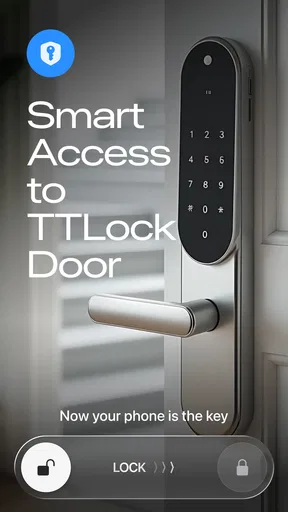
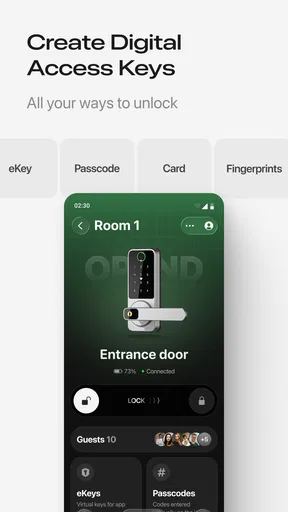
I spent time with Smart Lock for TTLock as a practical tool for managing compatible smart locks, and my overall impression is fairly clear: it is useful when your daily routine already depends on TTLock hardware, but it is not an app that makes sense on its own. Its job is focused rather than broad. You use it to handle access, unlock remotely, share digital keys, and look back through lock activity. That narrow purpose can be a real advantage, especially for a home, rental property, office, or small business where physical keys quickly become inconvenient.
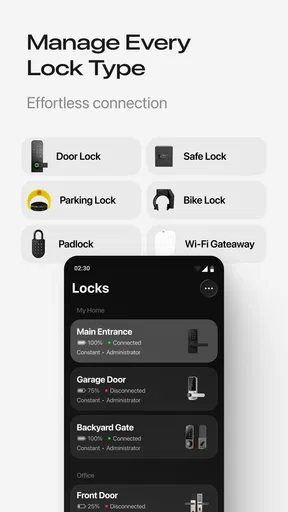
The app is developed by Solma Grow and sits in the tools category. It is free to install, rated for Everyone, and currently listed as version 1.0.6. I found that combination important because this is not a general smart-home dashboard trying to control every device in the house. It is a dedicated control point for TTLock-compatible devices. The most important question is not whether the app looks appealing, but whether your lock belongs to the TTLock ecosystem. If it does, the app can simplify access management. If it does not, installing it will not turn an ordinary lock into a smart one.
How Smart Lock for TTLock feels in everyday use
The central experience is built around replacing a physical key with controlled digital access. In a normal household, that could mean unlocking the front door from your phone instead of searching through a bag. In a rental or guest-room situation, it could mean giving someone access without handing over a copy of a key. For a small workplace, it offers a way to keep access organized when different people need entry at different times.
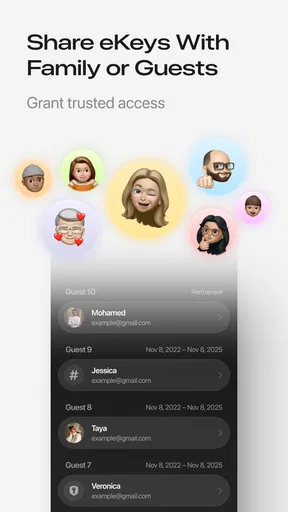
I like that the app’s purpose is easy to understand. Remote unlocking is the feature most people will notice first, but the ability to share eKeys is arguably more useful over time. A remote unlock helps in a single moment; a digital key can support a repeat arrangement with a family member, cleaner, contractor, tenant, or colleague. That changes the app from a simple remote button into an access-management tool.
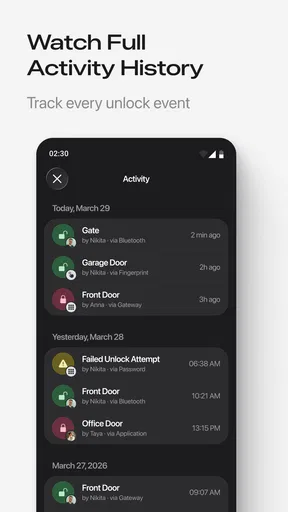
The history function is another part that deserves more attention than it usually gets in a short store description. A record of lock activity can help answer practical questions: whether someone entered, whether access happened around the expected time, or whether a shared key is still being used. I would not treat a history screen as a substitute for a full security system, but it can make everyday coordination less dependent on memory and messages.
A realistic example is a homeowner waiting for a delivery while away from home. Instead of leaving a key under a mat or asking a neighbor to be present, the owner can use the app to manage access remotely. The benefit is not just convenience; it is also the ability to avoid creating an uncontrolled copy of a physical key. The trade-off is that the arrangement depends on the lock, the phone, and the access setup all working as intended.
Why the access history matters
Many people focus on unlocking and overlook the value of reviewing activity afterward. I would use the history as a lightweight accountability tool. If several people share access to a door, the record can help establish a timeline when there is confusion about who entered or when a visit happened. That is particularly useful for properties with rotating guests or service workers.
Worth Reading Before You Choose

EA SPORTS FC Mobile 26 Is a Bigger Football Game, but It Takes Time

Flipboard Shows What News Apps Must Do Beyond the Feed

Switching to Android Auto Means Rethinking Your Driving Routine

Google Calendar Makes a Crowded Week Easier to Manage

Ludo King Makes the Most of the Minutes Between Plans

Baby Panda World Brings Quick Play to Modern Phones, but Its Game Library Feels Busy
There is also a useful habit here: review the history after creating or sharing an eKey rather than assuming the setup worked perfectly. That extra check can reveal whether the expected access event appears and can help you catch a mistake before it becomes urgent. It is a small workflow improvement, but it is more practical than simply installing the app and trusting every action without checking.
At the same time, I would avoid overinterpreting the history. It is a record connected to the smart-lock system, not proof of everything that happened inside a property. An unlock event can tell you about access to the door, but it does not explain why someone entered or what they did afterward. That distinction matters if you are considering the app for a business or rental where people may expect more comprehensive monitoring.
Sharing eKeys without losing control
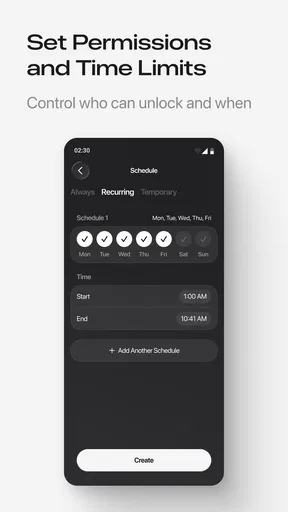
Digital keys are convenient, but they require the same discipline as physical keys. My advice is to treat each shared eKey as belonging to a specific person and purpose. Instead of sharing one general credential with everyone, create separate access arrangements where the app allows it and remove access when the relationship changes. This makes the history easier to interpret and reduces the risk of an old guest, former worker, or temporary helper retaining entry longer than intended.
This is also where the app may be better than a traditional key for some users. A metal key is simple, but copies can circulate without a clear record. A digital key can be easier to manage when several people need entry at different times. The downside is that digital access introduces new points of friction: recipients may need to install or use compatible software, understand the invitation, and keep their phone available.
For a family, that trade-off is usually manageable. For a group of occasional visitors, it may be less smooth. If someone is uncomfortable with smartphone-based access, a physical key or another access method may still be more appropriate. Smart Lock for TTLock is strongest when everyone involved is willing to use the same digital process.
Remote unlocking is useful, but not magic
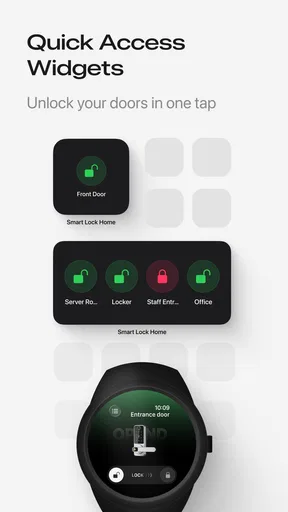
Remote unlocking is the feature most likely to influence a purchase decision, so it is worth being realistic about how it fits into daily life. It can be valuable when you are away from the door but need to let someone in, such as a family member arriving before you or a maintenance worker visiting an empty property. It can also reduce the need to rush home for a short appointment.
However, I would not build an important schedule around a single remote action without a backup plan. The app is part of a chain that includes the smart lock and the surrounding connection setup. If the phone is unavailable or the lock is not reachable at the right moment, convenience can turn into a delay. For an ordinary visit, that may be harmless. For a medical appointment, a time-sensitive repair, or a guest arriving late at night, I would still keep an alternative arrangement in mind.
That does not make remote unlocking a weak feature. It simply places it in the right category: a useful convenience for planned access, not a reason to abandon every backup method. I found this balanced approach more sensible than treating the app as a complete replacement for preparation.
What the current version means for new and existing users
Version 1.0.6 suggests that the product is still at an early stage of its visible development. The current release gives new users a focused way to manage TTLock devices, but I would judge it primarily on whether the essential actions are dependable: recognizing the correct lock, presenting access clearly, sharing keys without confusion, and making history understandable.
For someone starting fresh with a compatible lock, the app’s limited scope may actually help. There are fewer unrelated controls competing for attention, and the main tasks are easy to identify. I would begin by setting up the lock carefully, confirming that the correct device is selected, and testing access before relying on it for guests or workers. That first test is especially important because a digital access system should be verified while you are still physically near the door.
Existing TTLock users may approach the app differently. If you already have a working routine, the question is whether Smart Lock for TTLock makes that routine clearer or more convenient. The strongest reason to try it would be a need for straightforward remote access, eKey sharing, or a more accessible view of lock history. If your present setup already handles those tasks comfortably, changing apps may not produce a dramatic improvement.
I would also avoid assuming that a newer app version automatically changes the behavior of every compatible lock. The app is a control layer, while the lock model and its own capabilities still matter. Before planning a complicated access policy, test it with the exact device you own. A feature that is useful in principle may depend on the hardware or on how that lock handles connectivity.
Where it compares well with ordinary alternatives
Compared with a traditional key, the app offers more flexibility for remote access and sharing. You do not need to meet someone in person just to pass over a key, and you can use the activity history to add context to shared entry. That is a meaningful improvement for landlords, hosts, and households with changing schedules.
Compared with a broad smart-home app, its narrower focus can be easier to live with. A large home-control platform may be preferable if you want lighting, cameras, thermostats, and locks in one place. Smart Lock for TTLock is more appealing when the lock is the main concern and you do not want door access buried among unrelated devices.
Compared with a keypad or standalone access code, the app offers a more phone-centered workflow and can support remote management. A keypad may still be better for children, guests without smartphones, or situations where people need to enter without installing anything. In other words, the app is not automatically the best access method; it is the best fit when phone-based control is already acceptable to everyone involved.
Costs and the practical value of free installation
The app is free to install, which makes it easy to test before committing to a particular workflow. There are in-app purchases ranging from $2.99 to $99.99 per item, so I would pay attention to what any optional purchase unlocks before approving it. The free entry point is helpful, but it should not be confused with every possible function being cost-free.
For a single household, the value depends on how often remote access and sharing solve a real problem. If you rarely lend keys and are almost always home, the benefit may be modest. For a rental owner or small office, avoiding repeated key handoffs can justify exploring the app more seriously. I would make that decision based on the time and coordination it saves, not simply on the presence of a free download.
The app has passed the fifty-thousand-install mark and holds a 3.1 average from 105 ratings, with ten written reviews shown alongside it. Those figures suggest that interest exists, but the rating also tells me to keep expectations measured. I would install it for a specific TTLock need and test the important workflow first rather than assuming a universally polished experience.
Where the experience still needs care
The main weakness is dependence. Smart Lock for TTLock cannot be evaluated separately from the compatible lock, the access arrangement, and the people receiving digital keys. If any part of that chain is confusing, the app experience can feel unreliable even when the interface itself is doing its job.
Another limitation is that a focused lock app may not satisfy users who want one central place for an entire connected home. If you already rely on a different platform for cameras, alarms, and automation, adding a separate lock app may create another account, another notification source, and another routine to remember. That separation may be acceptable for a dedicated property, but it can feel less convenient in a busy smart home.
I also think the app is a poor choice for people who want to avoid digital access altogether. A physical key has obvious weaknesses, but it does not require a charged phone, an app workflow, or cooperation from a recipient who may not be comfortable with technology. Smart Lock for TTLock is designed for users who accept those trade-offs, not for someone looking for the simplest possible mechanical solution.
Privacy and responsibility deserve a practical mention too. Because the app can be used to manage entry and review activity, I would keep shared access limited and remove old permissions promptly. I would also avoid giving a permanent digital key for a one-time visit. That habit protects the usefulness of the history and keeps the access list from becoming a forgotten collection of past relationships.
Who should use it and who should skip it
I would recommend Smart Lock for TTLock to owners of compatible smart locks who regularly coordinate entry with other people. It is especially suitable for hosts, landlords, families with changing schedules, and small teams that need a simple way to share access and review activity. The app’s strongest value appears when physical key handoffs are a recurring nuisance.
I would be more cautious if you are still choosing a lock and have not committed to the TTLock ecosystem. In that situation, compare the entire hardware and software experience rather than choosing an app in isolation. Think about how guests will receive access, what happens when your phone is unavailable, and whether you need broader smart-home integration.
I would also suggest skipping it if your only requirement is occasional entry and everyone already has reliable physical keys. The app may add convenience, but it also adds a digital process. Not every household benefits from turning a simple door into another connected system.
What I would watch as the product develops
With version 1.0.6 as the current release, I would watch for improvements that make everyday access more predictable rather than simply adding more controls. Clearer sharing workflows, easier management of old eKeys, and a history view that helps users understand events at a glance would all matter more to me than decorative changes.
I would also look for evidence that the app handles different user types gracefully. A homeowner, a rental host, and a small office manager may all use the same core functions but need different levels of clarity. The best future direction would preserve the focused nature of the app while reducing the setup anxiety that comes with giving someone digital access to a door.
My final view is positive but measured. Smart Lock for TTLock is a useful tools app when you already have the right hardware and a genuine need to manage access from your phone. Remote unlocking, eKey sharing, and activity history form a sensible trio, and together they can remove a surprising amount of everyday coordination. I would recommend testing it with your exact lock, using a backup plan for important visits, and keeping shared access tidy. For the right TTLock user, that is enough to make the app worthwhile; for everyone else, a physical key or a broader smart-home solution may be the better answer.
Pros
- Unlocks compatible doors without carrying physical keys.
- Supports temporary access codes for guests and service providers.
- Useful activity logs help track lock usage and access events.
- Works with various TTLock-compatible smart lock models.
- Remote management can simplify access for rental properties.
Cons
- Requires a compatible TTLock smart lock to provide any benefit.
- Some features depend on Bluetooth
- Wi-Fi
- or a gateway device.
- Access logs and controls may raise privacy concerns for users.
- Battery-powered locks still require regular battery replacement.
- Setup can be confusing when pairing locks or configuring permissions.
FAQs for Smart Lock for TTLock
What is Smart Lock for TTLock, and what does it do?
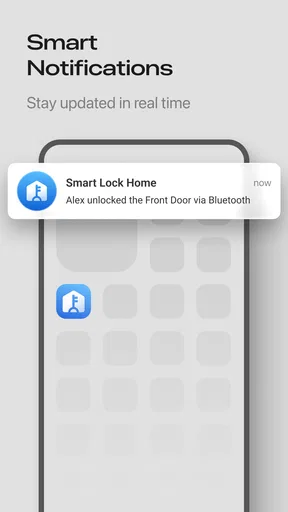
Smart Lock for TTLock is a companion application used to manage compatible electronic locks through the TTLock platform. After pairing a supported lock, the app can let you lock or unlock doors, create digital keys, issue temporary access permissions, review activity records, and manage users. The exact functions depend on the lock model, installation, administrator settings, and whether the device communicates through Bluetooth, Wi-Fi, or a separate gateway.
Does Smart Lock for TTLock work with every electronic or smart lock?
No. Smart Lock for TTLock is designed for locks that use the TTLock ecosystem, so compatibility is not universal. Before downloading or purchasing hardware, check the lock’s product description, manufacturer information, and supported TTLock features. Some models may support Bluetooth unlocking only, while others require a gateway for remote access, notifications, PIN codes, cards, fingerprints, or integration with additional management systems.
Can I unlock a TTLock remotely when I am away from the door?
Remote unlocking is not automatically available on every installation. Bluetooth-enabled locks generally require you to be near the door unless the system includes a compatible Wi-Fi or network gateway. With the appropriate gateway and a stable internet connection, an administrator may be able to manage the lock remotely, send temporary access, or check status. Availability also depends on the lock model and account permissions.
Is Smart Lock for TTLock safe to use for home, office, or rental access?
The app provides useful access-management tools, such as temporary keys, user permissions, and activity logs, which can be more convenient than sharing physical keys. However, security also depends on the lock hardware, phone protection, account password, Bluetooth or gateway configuration, and how carefully access rights are assigned. Use strong credentials, update the app and firmware, remove expired users, and keep a backup entry method available.
What should I do if the app cannot connect to or unlock my TTLock?
First, confirm that Bluetooth is enabled, the phone is close enough to the lock, and the app has the required permissions, including Bluetooth and location access where applicable. Check the lock’s batteries, restart the app, and verify that you are signed into the correct account with valid permission. If remote access is involved, inspect the gateway and internet connection. Avoid resetting the lock unless you understand the consequences, because a reset may remove keys or settings.


